Best Art Projector for Tracing and Enlargement: Clear Projections for Artists
Artists, crafters, and hobbyists can expand their crafting toolkit with dedicated art projectors that enlarge images for tracing, drawing, and mural work. This guide highlights five reliable options that suit classrooms, studios, and home use, focusing on resolution, brightness, versatility, and ease of use. Each pick is evaluated for how well it supports tracing, sketching, and design transfer on walls, canvases, and paper. Read on to compare features, compatibility, and practical considerations.
| Product | Copy Size | Enlargement Range | Best Use |
|---|---|---|---|
| Artograph EZ Tracer Opaque Art Projector | 4″ x 4″ | 2x to 10x | Wall art & murals |
| Artograph LED Tracer Opaque Art Projector | 5″ x 5″ | 2x to 14x | Sketching & signs |
| Caydo P3 Art Projector | 40″–120″ | 1080p with flexible zoom | Drawing & tracing on walls |
| VAXYOR Art Projector for Tracing | Varies by setup | 1080p, multiple modes | Fine-line tracing |
| HI-REEKE Art Projector for Tracing | Desktop size | 720p with WiFi | Portable sketching |
The following sections present five product profiles with concise, fact-based details to help buyers decide which projector best supports tracing, drawing, or pattern transfer. Each entry includes a direct link to the product page, a visual reference, and a summary of key features drawn from the official listings.
Artograph EZ Tracer Opaque Projector

The Artograph EZ Tracer enlarges artwork from 2x to 10x onto a wall, canvas, or other vertical surface. It is designed for use in darker environments to ensure clear projection, and is sized for compact spaces with a 4″ x 4″ copy area. It is compatible with wall art, murals, crafts, and learning activities, and its portability makes it suitable for classrooms and studios. Bulb recommendations emphasize LED options to avoid excess heat, with usage notes highlighting safe operation and dark-room requirements.
Artograph LED Tracer Opaque Projector

This LED-based model offers enlargement from 2x to 14x and supports copy sizes up to 5″ x 5″. The projector is advertised as durable and portable, with a 200 mm optical glass lens for clear projections. The LED light runs cooler and longer than incandescent or CFL bulbs, which is a practical benefit for extended tracing sessions, sketching, or small murals. Its compact dimensions make it suitable for studios, classrooms, or home use where space is a consideration.
RTSTEC Art Projector for Tracing

This wireless projection tool emphasizes iOS/Android compatibility through AirPlay and USB/HDMI inputs for diverse sources. It supports a broad range of projection distances, enabling 480P-like clarity with adjustable focus and a flexible effective projection size. It is best suited for users who want to mirror phone screens or project Canva designs for tracing, drawing, or painting projects. Note that Android compatibility is described as “not for Android” in one listing, so buyers should confirm device compatibility before purchase.
VAXYOR Art Projector for Tracing

The VAXYOR model emphasizes high-resolution 1080p projection with robust color accuracy. It supports wireless and wired connections, enabling smartphone mirroring, USB playback, and screen sharing. With multiple connectivity options and a user-friendly interface, this unit is positioned for artists who want quick transfer of smartphone sketches and reference images to larger surfaces. It is suitable for tracing, drawing, and educational demonstrations that require dependable image fidelity.
HI-REEKE Art Projector for Tracing
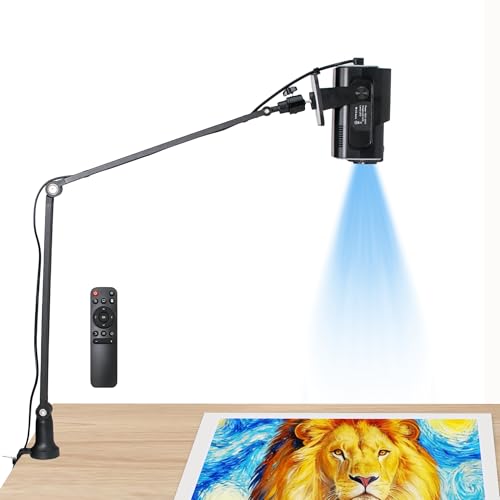
HI-REEKE offers a compact tracing projector with 1280×720 resolution and basic connectivity options, including 2.4G WiFi and USB drive support. It is pitched as a portable option for artists who need quick setup on a desk or canvas, with emphasis on clear projection and easy image import. This model is well-suited for beginners and classroom activities where a lightweight, straightforward tracing projector is advantageous.
Caydo P3 Art Projector

The Caydo P3 pairs 1080P projection with a feature-rich app designed for drawing, including zoom, rotation, and grid templates. The device claims 40″–120″ projection range with 400 ANSI lumens, maintaining color accuracy and detail for tracing and reference projection. It supports iOS/Android compatibility, flexible screen sizes, and an enhanced app experience that guides artists through drawing workflows. It’s a strong option for those who want integrated drawing tools alongside projection.
Buying Guide: Key Purchase Considerations
- Resolution and image clarity: Higher resolution and sharper projection help with fine lines and detailed tracing. Look for 1080p or better, with a crisp focus and good color accuracy.
- Brightness and ambient light: Most tracing work benefits from a dim environment. Choose models with strong brightness or that are marketed for use in darker rooms to minimize ambient light interference.
- Copy size and projection range: Copy area size and zoom range determine what kinds of projects you can handle, from small sketches to large murals. Consider your typical artwork size before choosing.
- Connectivity: USB, HDMI, and wireless screen sharing expand source options. Some models support iOS/Android wireless mirroring, which can be convenient for quick tracing from mobile devices.
- Portability and setup: If you plan to move between spaces, a lightweight, easy-to-assemble projector will save time. Check weight, dimensions, and whether it includes a stable stand or mounting options.
- Durability and heat management: LED-based units run cooler and longer than traditional bulbs, reducing the risk of heat-related issues during extended sessions.
- Compatibility with surfaces: Consider whether you’ll project onto walls, canvases, or easels, and ensure the projection size and focus work well for your preferred surfaces.
- Software and apps: Some models come with companion apps that enhance tracing workflows, grids, or drawing aids. If you rely on a specific workflow, verify app compatibility and features.
- Budget and support: Prices vary by features. Look for models with reliable customer support and readily available replacement parts or bulbs if needed later on.
In selecting an art projector for tracing and enlargement, users should weigh how often they work in dim environments, the range of artwork sizes they handle, and whether they prefer maximum portability or built-in tracing aids. The five choices highlighted here provide a spectrum of options—from straightforward opaque tracers to feature-rich projectors with multi-source inputs—so artists can align a projector with their practice, whether for classrooms, studios, or home studios.
Leave a Reply