Best Clear Printed Labels: 5 Top Sticker Papers for Professional-Looking Results
Looking for nearly invisible labels and decals that still grab attention? This guide highlights five clear label and sticker papers designed for inkjet and laser printers. Each option balances transparency, adhesion, and ease of use, so you can create sleek branding, product tags, or elegant envelopes without a bulky label border. Below, compare features, suitability, and practical tips to help you choose the right clear label solution for your projects.
| Product | Finish | Printer Type | Notable Benefit |
|---|---|---|---|
| SMALL SMILE 95% Clear Sticker Paper | 95% Clear | Inkjet & Laser | Nearly invisible decals on light surfaces |
| Avery Sure Feed 1″ x 2-5/8″ Clear Labels (18660) | Matte Clear | Inkjet & Laser | Easy Peel, reliable feed for clean printing |
| Avery Round 2″ Clear Labels (22825) | Glossy Clear | Inkjet & Laser | Edge-to-edge printing for bold designs |
| Avery Glossy Clear Sticker Paper (4397) | Glossy Clear | Laser & Inkjet | Professional-looking, durable sheets |
| Aevdor 30 Sheets Clear Sticker Paper | Clear Vinyl | Inkjet | Vibrant colors and quick-dry performance |
SmAll Smile 95% Clear Sticker Paper

The SMALL SMILE 95% Clear Sticker Paper is designed for near-invisible application, ideal for labels and decals on light or smooth backgrounds. It supports both inkjet and laser printers. For best results, use Photo, Best, or Labels/Heavy Paper settings and a color print mode, then allow ink to dry completely before handling. Backing is a clear peel-and-stick type for straightforward application, offering strong adhesion on most surfaces without visible borders.
Avery Sure Feed Matte Clear Labels (18660)
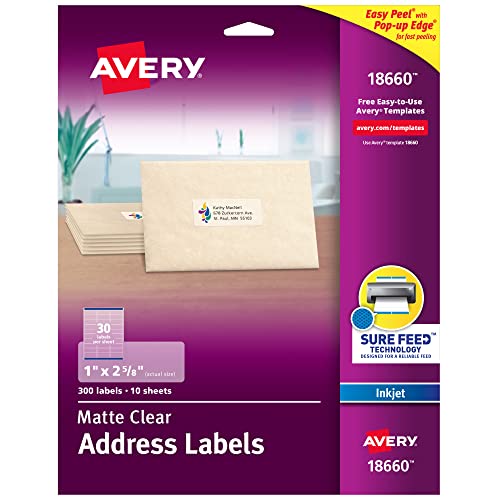
Avery’s Sure Feed technology helps reduce misfeeds and jams, delivering a reliable printing experience with a seamless, frosted-clear appearance. These 1″ x 2-5/8″ labels blend beautifully on white or light envelopes, vellum, or frosted glass, creating a sophisticated, unobtrusive look. The Easy Peel with Pop-up Edge feature makes removal quick and easy, ideal for high-volume labeling tasks.
Avery Round Clear Labels with Sure Feed (22825)

These 2″ diameter round labels offer a print-to-the-edge feature for a professional look with full-bleed design. They’re suitable for laser and inkjet printers, enabling bold colors and crisp lines on circular tags, product seals, or party favors. Avery provides free templates to simplify design, and the Sure Feed system helps maintain alignment and reduce misprinting.
Avery Glossy Clear Sticker Paper (4397)

Glossy clear sticker sheets from Avery provide a polished, printed-on appearance suitable for product branding, labels, and craft projects. The permanent adhesive sticks well to glass, plastic, metal, and paper, and the sheets can be used for large one-off stickers or multiple cut shapes. This option supports both laser and inkjet printing for versatile use.
Aevdor 30 Sheets Clear Sticker Paper

Aevdor’s printable clear sticker paper comes in 30 sheets of 8.5×11″ vinyl, designed for inkjet printers with a brief dry time. It promises vibrant colors and lasting adhesion on non-waterproof surfaces. While not ideal for prolonged outdoor use, it’s a strong option for indoor branding, crafts, and labels requiring bright, true-to-color reproduction.
Avery Glossy Clear Address Labels (6521)
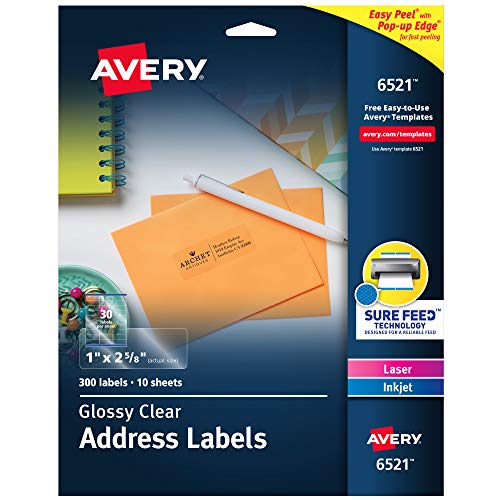
These glossy, crystal-clear address labels disappear onto glass, plastic, and cellophane, delivering a printed-on effect for professional correspondence. The Easy Peel with Pop-up Edge feature speeds labeling workflows, while Sure Feed technology improves printer reliability by reducing feeding errors across laser and inkjet devices.
Buying Guide: Key Purchase Considerations
When choosing clear labels, consider the following factors to match your needs and equipment:
- Transparency and Background: 95% clear options minimize borders on light surfaces, while matte or glossy clear finishes influence readability and appearance on different substrates.
- Printer Compatibility: Ensure the label stock supports your printer type (inkjet, laser, or both) and whether you require edge-to-edge or standard printing.
- Adhesive Strength and Surface Compatibility: Permanent adhesives work well on glass, plastic, metal, and paper, but some surfaces, like textured or dusty backgrounds, may require extra prep or a stronger backing.
- Ease of Use: Features like Easy Peel, pop-up edges, and reliable feed systems reduce misfeeds and improve labeling throughput in busy environments.
- Drying Time and Durability: Ink drying times affect handling, especially for glossy stock. Waterproof or oil-proof options suit outdoor or refrigerated contexts, while non-waterproof papers may be best for indoor use.
- Color Reproduction: Choose products designed for vibrant color printing if you need bold branding or photo-quality labels; check if the stock handles bleed and edge-to-edge printing.
- Customizability: Some lines offer templates and design tools, helping you achieve precise alignment and professional layouts without specialized software.
- Budget and Availability: Compare costs per sheet or label and consider whether a larger pack offers better value for recurring labeling tasks.
Leave a Reply