Best Desktop Vinyl Cutter for Home and Small Studio Projects
If you’re shopping for a desktop vinyl cutter, you want a machine that is easy to use, reliable, and capable of handling a variety of materials. This guide highlights five strong options and explains who each is best for. You’ll find compact cutters for beginners, versatile machines with built‑in scanners, and larger desktop models designed for signs and craft projects. Use the buying guide and FAQs to compare features and choose the right fit for your needs.
| Product | Best For | Key Benefit |
|---|---|---|
| Brother ScanNCut SDX85C | DIY crafters who want built‑in scanning | Auto blade with material sensor for no guesswork |
| Cricut Joy Xtra | Small projects and quick edits | Draws, foils, Print‑then‑Cut |
| VEVOR 28-inch Cutting Machine | Sign making and larger vinyl jobs | Large feed width with LCD control |
| LIKCUT S41 | Room decor and party crafts | Print‑then‑cut workflow with dual connectivity |
| LIKCUT S501 | AI‑driven sticker making | AI image generation and fast cutting |
Brother ScanNCut SDX85C Electronic Cutting Machine
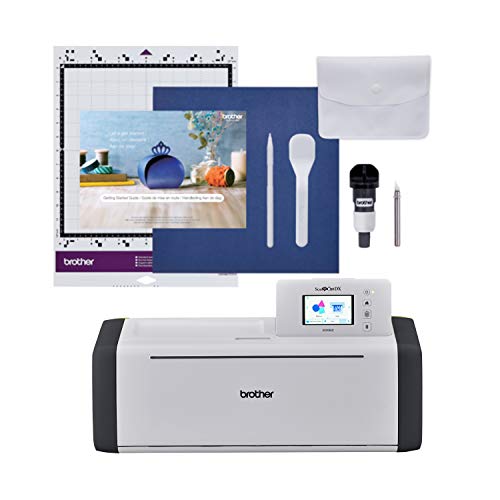
The Brother ScanNCut SDX85C integrates a built‑in scanner with a cutting engine. It can convert scanned drawings into cut files and directly cut printed stickers. It ships with 251 built‑in designs and supports additional patterns via USB or wireless connectivity. The machine includes a 3.5″ touchscreen for easy project management. Best for crafters who want to scan hand drawings and create precise vinyl cuts without separate software.
Who it’s best for: crafters who want an all‑in‑one solution with scanning capabilities and a straightforward interface. Why chosen: the built‑in scanner reduces pre‑layout work and enables precise placement of designs. Caution: the need for a trial cut is recommended due to material variability.
Cricut Joy Xtra Digital Version

The Cricut Joy Xtra offers a portable, beginner‑friendly option with cutting, drawing, foiling, and Print‑Then‑Cut features. It supports 50+ materials and integrates with Design Space for custom designs, plus a starter bundle with tools and a welcome card. Best for: hobbyists who want a compact cutter with creative versatility and color design options. Caution: not ideal for heavy production or large‑format vinyl jobs; its small bed limits material size.
VEVOR 28-Inch Cutting Machine

This VEVOR model is a larger desktop cutter with a wide feeder and LCD control. It uses two adjustable spring rollers, a precise scale, and a software suite through Signmaster compatibility. Best for sign makers and bigger vinyl projects that require steadier feeding and higher cutting width. Caution: user familiarity with software interfaces helps maximize the tool’s potential; it’s not a compact option for tiny craft spaces.
LIKCUT S501 AI Smart Sticker Maker
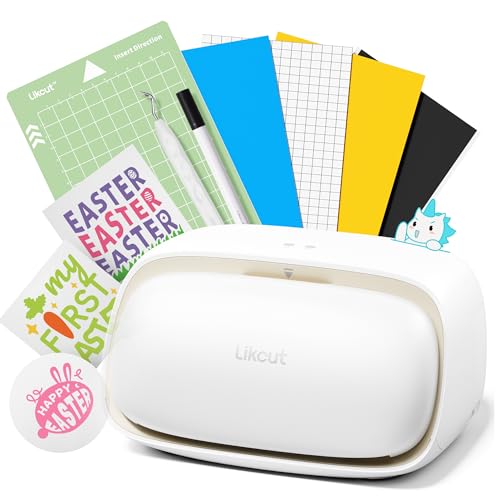
The LIKCUT S501 emphasizes AI‑assisted design and portable workflow for sticker making. It supports Bluetooth and USB connections, offering fast cutting with long‑haul blade capability. Best for: creators who want AI image generation and quick, repeatable sticker production. Caution: as with many AI workflows, design results depend on input quality and software interpretation, so outputs may vary.
VEVOR Cutting Machine with Design Software

This VEVOR model combines automatic edge detection with design software and broad file compatibility (SVG, EPS, PLT, AI). It supports 100+ materials and offers adjustable blade pressure. Best for: crafters who want a versatile cutter that supports complex designs and multiple media types. Caution: the software bundle may require a learning curve for new users.
Buying Guide: Desktop Vinyl Cutter Essentials
- Size and workspace: Consider bed width, cutting width, and whether you need a large feeder for signs or a compact unit for small craft projects.
- Material support: Check which materials you plan to use (vinyl, HTV, cardstock, paper, sticker sheets) and ensure compatibility.
- Connectivity: USB, Bluetooth, and Wi‑Fi options affect convenience, especially for quick design transfers or classroom use.
- Software and design ecosystem: Some machines include software with preinstalled libraries; others rely on third‑party tools. Consider whether you need Print‑Then‑Cut, drawing, or AI image generation.
- Automatic features: Auto blade, auto material sensing, and edge detection reduce manual setup, but verify what level of trial cutting is advisable for your materials.
- Support and updates: Built‑in scanners or ongoing software updates can influence long‑term usability and value.
- Safety and reliability: Look for stable feeding mechanisms, robust clamps, and clear safety features, especially for multi‑material projects.
Frequently Asked Questions
- What is the main difference between a desktop vinyl cutter with a built‑in scanner and one without?
Machines with scanners can convert drawings to cut files directly, enabling precise reproduction of hand drawings. - Is a larger cutting width better for vinyl projects?
A larger cutting width increases capability for bigger signs and decals but requires more workspace and may raise price. - Do I need dedicated software to use these cutters?
Many models include software, while others work with third‑party programs. Check compatibility with your preferred design tools. - Can vinyl cutters also print or draw in addition to cutting?
Some models offer Print‑Then‑Cut or drawing modes, increasing versatility for stickers and cards. - Are AI features essential in a vinyl cutter?
AI features can speed up design workflows and automate some steps, but they are not strictly necessary for basic cutting tasks. - What should I consider if I have a small workspace?
Prioritize a compact machine with a clear cutting width that matches your typical project size and an intuitive interface.
Leave a Reply