Best Drawing Tablet for Tattoo Artists: Top Tablets for Precise Ink
The right drawing tablet can elevate tattoo design, flash artwork, and digital illustration by delivering precise lines, natural shading, and reliable color accuracy. This guide highlights five top tablets that balance pen sensitivity, screen quality, and workflow features to support tattoo artists in creating bold, intricate designs. Each entry includes a clickable Amazon link, an image, and key features to help you compare at a glance.
| Product | Brand | Key Strength |
|---|---|---|
| Artist 13.3 Pro with Screen | XP-Pen | Tilt shading and wide color gamut |
| Artist 15.6 Pro V2 with Screen | XP-Pen | 16384 pressure levels; Red Dial workflow |
| Inspiroy H1060P | HUION | 12 hot keys; battery-free stylus |
| LitEnergy A4 LED Copy Board | LitEnergy | Ultra-thin tracing light with adjustable brightness |
| Artist Pro 14 Gen2 | XP-Pen | 16K pressure, full laminated screen |
XP-Pen Artist 13.3 Pro With Screen

The XP-Pen Artist 13.3 Pro features a 13.3-inch fully laminated display with a wide color gamut and 178-degree viewing angle. It supports up to 60-degree tilt for shading and smoother transitions, which can be valuable for tattoo concepting and line work. The 8,192 pressure levels on the pen provide nuanced control for clean outlines and subtle shading. A 3-in-1 cable ensures reliable computer connection, making it suitable for studio setups and on-site work.
XP-Pen Artist 15.6 Pro V2 With Screen

The 15.6-inch Pro V2 introduces a high-precision 16,384-pressure stylus, delivering finely controlled lines suitable for tattoo design details. The Red Dial interface provides quick access to brush size, navigation, and zoom, optimizing workflow during layered design sessions. Its full-laminated display minimizes parallax, enhancing accuracy when tracing motifs onto skin or digital canvases. This tablet aims at professional use with a broad color space and smooth pen performance.
HUION Inspiroy H1060P

HUION’s Inspiroy H1060P offers a 10 x 6.25-inch drawing area and a battery-free PW100 stylus with ±60° tilt support, enabling expressive shading for tattoo sketches. It includes 12 programmable hard keys and 16 soft keys, letting artists customize shortcuts for quick access to eraser, zoom, undo, and more. The tablet’s slim profile and lightweight build support portability between studio and client consultations.
LitEnergy A4 LED Copy Board
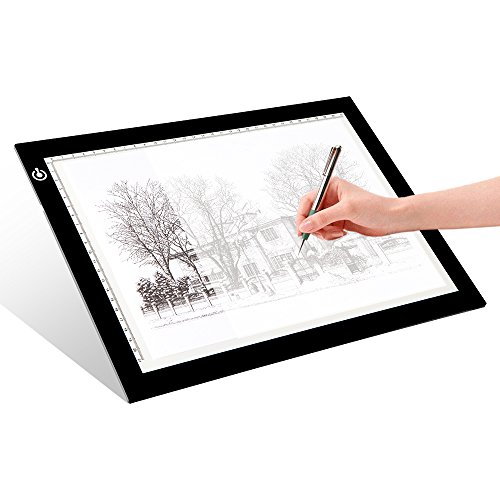
The LitEnergy A4 LED Copy Board is a slim tracing light pad designed for tattoo transfer planning and stencil creation. It features adjustable brightness with a touch switch, a large 9″ x 12″ working area, and energy-efficient flicker-free LEDs. The compact form makes it easy to transport for artist travels, guest artist days, or studio setup adjustments. This tool excels as a reusable stencil aid in tattoo workflows.
XP-Pen Artist Pro 14 Gen2

The XP-Pen Artist Pro 14 Gen2 combines a 14-inch full laminated anti-glare screen with a 16,384-pressure X3 Pro stylus. Its 178-degree viewing angle and 250-nit brightness provide solid color accuracy and clarity for tattoo concepts, coloring checks, and stencil planning. The package includes a 3-in-1 cable, and the white-box stylus storage helps maintain a clean studio setup. This option prioritizes precision and comfort for long design sessions.
XP-Pen Artist13.3 Pro V2 16384 Pressure

The Artist13.3 Pro V2 delivers 16,384 pressure levels with tilt support, a true-to-life 13.3″ screen, and a 24-step dial-driven workflow for efficient editing. Its true color rendering (high sRGB/Adobe RGB) makes it suitable for tattoo designs where accurate color preview matters. The Red Dial and shortcut keys enable rapid access to essential tools, streamlining the design process from concept to stencil-ready artwork.
Buying Guide
- Pen pressure and tilt sensitivity: For tattoo art, higher pressure ranges (up to 16K) and tilt support enable nuanced shading and line weight control that mimic traditional tattoo techniques.
- Screen and color accuracy: Full-laminated displays reduce parallax and improve line placement. Look for wide color gamuts (sRGB/Adobe RGB) for faithful color replication.
- Workflow features: Quick access via programmable keys or dials speeds up repetitive tasks, especially during stencil planning and inking phases.
- Connection needs: Some tablets require a computer; others are standalone. Consider your studio setup and whether you need mobile capabilities for client consultations.
- Portability vs. size: Larger screens offer more drawing area but can be less convenient for travel. Balance workspace, desk space, and ergonomic comfort.
- Stability and drivers: Reliable drivers and driver customization can avoid input lag or driver crashes during intricate designs.
- Stylus experience: Battery-free styluses reduce interruptions; weight and grip affect long sessions. Check nib availability and replacement options.
- Build and warranty: A sturdy build and a solid warranty reduce downtime in a busy studio environment.
- Software compatibility: Confirm compatibility with your preferred design software (Photoshop, Procreate on compatible devices, Illustrator, etc.).
When choosing among these options, rank priorities such as screen size, color accuracy, and the level of tilt support, then align those with your typical tattoo workflow—from concept sketches to stencil transfers and final line work. Each model listed offers a distinct balance of features to fit different studio needs and travel scenarios.
Leave a Reply