Best Embroidery Machines for Beginners: Easy Start Packages for Creators
Starting with embroidery is easier when you choose a machine designed for beginners. This guide highlights five user-friendly options that balance built-in designs, simple transfer methods, and reliable performance. Whether you want to personalize apparel, gifts, or home decor, these machines provide intuitive features to help you grow from basic stitching to complex embroidery projects.
| Product | Brand | Key Benefit | Amazon Link |
|---|---|---|---|
| Brother SE700 Sewing and Embroidery Machine | Brother | Wireless, 135 designs, 4″ x 4″ hoop, 3.7″ touchscreen | View |
| Brother PE545 Embroidery Machine | Brother | Wireless transfer, 4″ x 4″ hoop, large 3.7″ LCD | View |
| PooLin EOC05 Embroidery Machine | Poolin | Beginner-focused, 4″ x 9.25″ area, embroidery-only | View |
| PooLin EOC06 Embroidery Machine | Poolin | 7.9″ x 11″ hoop, 200 designs, USB & wireless | View |
| Brother PE535 Embroidery Machine | Brother | 80 designs, 4″ x 4″ hoop, USB design storage | View |
Brother SE700 Sewing and Embroidery Machine

The SE700 combines sewing and embroidery functions in one unit, ideal for beginners who want to explore both crafts. It features wireless connectivity to transfer designs from a PC or mobile device, a 4″ x 4″ embroidery area, 135 built-in designs, and a 3.7″ touchscreen for easy editing. Included software enables Design Database Transfer, and the ARTSPIRA mobile app supports pattern creation and wireless transfer. The compact hoop size keeps projects manageable while offering room to learn basic embroidery skills.
Brother PE545 Embroidery Machine

The PE545 is a compact embroidery-focused model with a 4″ x 4″ field and a large 3.7″ LCD touchscreen for easy design selection. Wireless transfer via Design Database Transfer and USB connectivity simplify moving designs from a computer to the machine. With 135 built-in designs and 10 font styles, beginners can start personalizing projects right away while gradually expanding their design library.
PooLin EOC05 Embroidery Machine

Designed specifically for beginners, this embroidery-only machine offers a 4″ x 9.25″ field, providing comfortable space for small to medium projects. It emphasizes ease of use with a straightforward learning curve and home DIY suitability, helping new users gain confidence as they learn the basics of embroidery without the complexity of sewing functions.
PooLin EOC06 Embroidery Machine
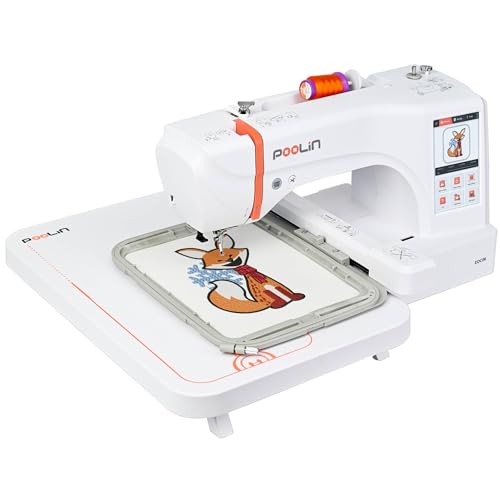
The EOC06 expands capabilities with a 7.9″ x 11″ hoop area and 200 built-in designs. It supports file transfers via USB or Wireless LAN and includes multiple hoop sizes to accommodate larger patterns. The package promotes learning with additional resources and customer support through social channels, helping beginners build skills while exploring more complex designs.
Brother PE535 Embroidery Machine

The PE535 offers 80 built-in embroidery designs and 9 fonts, with a 4″ x 4″ hoop for compact projects. A USB port lets users upload and store designs directly into the machine’s memory. This model provides a balance of essential features for beginners and a straightforward path to expanding design options as skills grow.
Buying Guide: Key Considerations for Beginner Embroiderers
Design library and expansion: Look for machines with a solid number of built-in designs and compatibility with downloadable designs. Compare USB and wireless transfer options to ease moving designs from devices to the machine.
Hoop size and project scale: Beginners often start with smaller projects. A 4″ x 4″ hoop is common, but larger fields like 5″ x 7″ or 7.9″ x 11″ expand possibilities for clothing and home decor. Consider whether the machine includes multiple hoops.
User interface: A responsive touchscreen and intuitive menus shorten the learning curve. For new users, on-screen editing, fonts, and simple pattern adjustments matter more than advanced features.
All-in-one vs. embroidery-only: Some machines offer both sewing and embroidery, which appeals to beginners who want versatility. Embroidery-only machines may simplify operations but limit sewing projects.
Connectivity and software: Wireless transfer, cloud connections, and companion apps can streamline pattern creation. Verify software compatibility and whether any transfer apps are free or require subscriptions.
Support and education: Beginner-friendly machines often come with tutorials, online guides, and access to user communities. Manufacturer support and available training can accelerate mastery.
Budget and future goals: Prioritize features that match your immediate needs (e.g., 4″ x 4″ hoop, basic designs) while leaving room to grow to larger hoops, more complex designs, and monogramming when ready.
Maintenance and supplies: Check for availability of replacement parts, hoops, needles, and stabilizers. A robust accessory kit can save time and frustration for new users.
Leave a Reply