Best Embroidery Machine for the Money: Top Picks for Value and Performance
Looking for an embroidery machine that balances affordable cost with practical features? These five machines provide solid embroidery performance without breaking the bank, making them ideal for beginners, hobbyists, or small projects. The top picks cover wireless transfer, large embroidery areas, multiple hoops, and beginner-friendly interfaces. The list highlights who each machine is best for and why it’s a good value choice.
| Product | Best For |
|---|---|
| Brother SE700 Sewing and Embroidery Machine | Beginners who want built-in designs and wireless transfer |
| Brother SE700 Combo Embroidery & Sewing Machine | Users needing multiple hoops and bundled accessories |
| PooLin EOC06 Embroidery Machine | Large embroidery area and USB/Wireless file transfer |
| Smartstitch S-1001 Upgraded Embroidery Machine | Compact commercial-like features and quick setup |
| SPARESPHERE SS-1501 Commercial 15 Needles | Capable multi-hoop work and larger projects |
Brother SE700 Sewing and Embroidery Machine

The Brother SE700 combines sewing and embroidery in one compact package. It ships with 135 built-in designs and 103 stitches, plus wireless LAN compatibility for easy file transfer via Design Database Transfer or USB. This model suits buyers who want an all-in-one device with modern connectivity and a responsive 3.7-inch touchscreen. Best for: hobbyists seeking an affordable, feature-rich entry into machine embroidery with straightforward setup.
Caution: While the SE700 is feature-rich, its 4″ x 4″ embroidery area may feel small for larger projects. Consider this when planning bulk or large patterns.
Brother SE700 Combo Embroidery & Sewing Machine

This bundle adds four embroidery hoops and a comprehensive thread/accessory set to the SE700 experience. It’s designed for users who want more hoop versatility and ready-to-use supplies, enabling quick setup for multiple projects. Best for: crafters who frequently switch designs and fabrics and appreciate bundled accessories for faster workflow.
Limitation: The included hooped areas focus on standard sizes; very large designs may still require larger-capacity machines.
PooLin EOC06 Embroidery Machine

The PooLin EOC06 emphasizes a larger embroidery area (11″ x 7.9″ / 7.9″ x 7.9″) and flexible transfer options via USB or wireless Best for: crafters or small shops needing bigger patterns and wireless transfer for easier design loading. It supports a wide array of projects from apparel to home textiles.
Note: Some users may require a learning period to optimize digitizing and file transfer processes for optimal results.
Smartstitch S-1001 Upgraded Embroidery Machine

The S-1001 targets serious hobbyists and aspiring pros with a 9.5″ x 14.2″ embroidery area and 1200 SPM. It features auto thread trimming, auto color changing, and a laser positioning system for precise placement. Best for: owners seeking a compact machine with professional features at a competitive price. Limitation: While feature-rich, it may require some setup time for full optimization and digitizing tasks.
SPARESPHERE SS-1501 Commercial 15 Needles
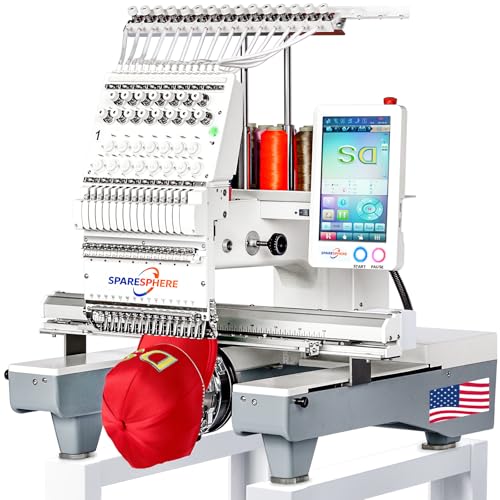
The SpareSphere SS-1501 is a 15-needle machine with a 14″ x 20″ embroidery area and a high 1200 SPM speed. It includes a large HD touchscreen, laser positioning, and automatic thread handling features. Best for: serious crafters or small businesses needing fast, multi-design production on larger items. Caution: Its higher capability comes with a steeper learning curve and larger footprint.
Buying Guide
- Embroidery area size: Choose based on project scope. Small designs fit 4″ x 4″ hoops, while larger items benefit from 7.9″ or 11″ areas.
- Hoop versatility: More included hoops enable diverse fabrics and garment placement. Bundles with extra hoops save setup time.
- Transfer method: USB, Wi‑Fi, or app-based transfers affect workflow. Wireless options simplify moving designs from a PC or phone.
- Speed and automation: Look for auto thread trimming and color change features for efficiency on busy projects.
- Learning curve and support: Beginners benefit from guided tutorials or user groups; advanced users may value detailed manuals and professional service.
FAQ
- What should I look for in a beginner-friendly embroidery machine? Look for built-in designs, a clear touchscreen, simple file transfer (USB or Wi‑Fi), and a compact footprint for home use.
- Is a larger embroidery area always better? Larger areas enable bigger designs and fewer hoop changes, but they increase machine size and cost.
- Do bundles offer real value? Bundles with extra hoops and a thread set can save money and setup time for new users.
- Can I use my own designs? Most machines support DST, PES, PHC, or similar formats; check compatibility for your preferred software.
- Is professional support important? Yes, especially for more advanced machines; look for manuals, online resources, and responsive assistance.
- Which machine is best for a home hobbyist on a budget? A model with 4″ x 4″ embroidery, USB transfer, and bundled accessories often provides the best balance of price and capability.
Leave a Reply