Best Inkjet Iron on Transfer Paper for DIY Shirts and More
If you’re searching for inkjet-compatible iron-on transfer paper, you’ve found a practical guide to clear, actionable choices. This article focuses on transfer papers that work with inkjet printers and are suitable for everyday fabrics like cotton T‑shirts, totes, and apparel. Each product is described for the buyer’s best use case—whether you need dark fabrics, light fabrics, or mixed packs. The list below highlights five options that balance ease of use, compatibility, and results for common home projects.
Summary table of selected products:
- TransOurDream Dark Transfer Paper for Dark T Shirts (20 Sheets) — best for bold, vivid dark-color designs on 70–100% cotton fabrics.
- TransOurDream Upgraded Light Transfer Paper (15 Sheets) — best for light fabrics and white or pale-colored garments.
- TransOurDream Upgraded Light Transfer Paper (20 Sheets) — best for larger light-color applications and easy cutting with machines.
- TransOurDream Mixed Dark & Light Pack (5+5 Sheets) — best for versatile projects requiring both dark and light options.
Tru-Heat option TransOurDream Tru-Heat for Inkjet & Laserjet (Dark 3.0) — best for durable, machine-washable transfers on dark fabrics.
TransOurDream Dark Transfer Paper for Dark T Shirts

Best for: crafters and small-business makers targeting dark cotton apparel. This pack includes 20 sheets of dark transfer paper plus reusable Teflon paper, designed to yield vibrant, soft, machine-washable transfers. The product notes emphasize stretchability and ease of cutting, making it suitable for straight cuts or simple dies. Best used with pigment or dye inks on inkjet printers.
Why selected: It provides a comprehensive dark-transfer setup in one package, making it practical for on-demand shirts, hoodies, and bags. The included Teflon sheet helps protect the transfer during press.
Caution: Do not exceed recommended heat settings; excessive heat can affect the vinyl-like feel of transfers. Ensure fabric content is within the 70–100% cotton range for best results.
TransOurDream Upgraded Light Transfer Paper (15 Sheets)
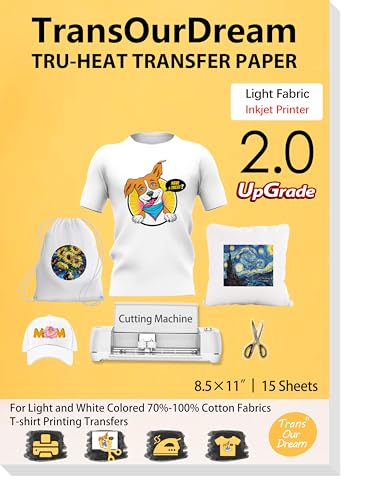
Best for: light-colored fabrics and white garments where bright, crisp images are desired. This second-generation light transfer paper is designed to be easily cut and ironed, with a lower melting point than competitors. It supports non-mirror printing and aims for vibrant color transfer on light cotton blends.
Why selected: It’s optimized for light fabrics and provides clear color reproduction with less risk of cracking or peeling when properly pressed. The included guidelines cover compatibility with common inkjet printers and simple pressing steps.
Caution: Do not use sublimation ink with this paper. For best results, print with dye or pigment inks and ensure proper fabric preparation before pressing.
TransOurDream Upgraded Light Transfer Paper (20 Sheets)

Best for: more extensive light-fabric projects where precision cutting is helpful. This pack expands on the 15-sheet option with an improved light transfer formula that works with cutting machines and scissors. It’s designed to produce brighter colors and easier transfer on white and light fabrics.
Why selected: The 2.0 light transfer formulation improves cut-ability and color vibrancy, and it remains inkjet-printer friendly. It supports a wide range of light fabrics from T-shirts to tote bags.
Caution: Avoid using sublimation ink; ensure you’re using pigment or dye inks and follow temperature guidance for your heat source to prevent over-pressing.
TransOurDream Heat Transfer Paper for Dark & Light Mix (Mix Pack)

Best for: creators who want flexibility to switch between dark and light fabrics in a single project or batch. This mix pack includes five sheets of dark 1.0 transfer paper, five sheets of light 2.0 transfer paper, and a reusable Teflon sheet.
Why selected: It provides the convenience of having both dark and light transfer options in one order, enabling quick experimentation and multi-fabric output without buying separate packs.
Caution: The mix requires careful adherence to heat guidance for each type (dark vs. light), as pressing temperatures and times differ slightly between media.
TransOurDream Tru-Heat Transfer Paper for Inkjet & Laserjet (Dark 3.0)

Best for: users needing durable, all-in-one dark-fabric transfers compatible with both inkjet and laser printers. The Dark 3.0 variant is designed for vivid results that endure cold-water washing cycles and extended wear.
Why selected: It supports dual-printer compatibility and provides a robust transfer for dark fabrics. This option is particularly helpful for projects that will see frequent washing or long-term use.
Caution: Verify that your printer is configured to handle the specific ink type (pigment/dye) and avoid sublimation inks for these papers to prevent color shifts.
Buying Guide
What to consider when choosing inkjet iron-on transfer paper:
- Fabric type: Dark transfer papers are optimized for dark fabrics, while light transfer papers excel on white or pale fabrics. Mixed packs offer versatility but may require careful matching by project.
- Printer compatibility: Most papers work with inkjet printers; some high-end options also support laser printers. Check your printer type and ink type (pigment vs dye) before printing.
- Color vibrancy and wash durability: Look for papers that promise vivid colors and machine-washable results. Some papers specify lower heat settings to preserve fabric integrity and print quality.
- Cutting and application: If you use a cutting machine, select papers described as “easy to cut” or “Cricut-compatible.”
- Included accessories: Reusable Teflon papers help protect transfers; packs with multiple sheets reduce the need for frequent re-orders.
Practical tips for best results:
- Prepare fabrics by washing and drying without fabric softener; iron to remove wrinkles before applying transfers.
- Print on the correct side and let inks dry completely before cutting or transferring.
- Use the recommended heat setting and pressing duration for the chosen paper type; follow the included instructions for best transfer adhesion.
- Avoid extended heat exposure after pressing; allow the garment to cool before handling to prevent smudging.
Frequently Asked Questions
- What is the best transfer paper for dark fabrics?
Dark-fabric papers, such as the TransOurDream Dark Transfer Paper, are designed to produce bold colors on dark materials and typically include a protective layer to preserve the print during washing.
- Can I use inkjet printers with light transfer papers?
Yes. Light transfer papers are intended for white or light fabrics and inkjet printers; pigment or dye inks work well when used with the paper’s guidelines.
- Do these papers work with laser printers?
Some papers specify compatibility with both inkjet and laser printers. Always confirm the printer type on the product page before purchasing.
- Is a Teflon sheet included with these packs?
Many packs include a reusable Teflon sheet, but availability varies by SKU. Check the product features to confirm inclusion.
- How many washes do transfers typically endure?
Transfer durability depends on ink type and fabric; many papers claim machine-washable results, but avoiding high-heat tumble drying helps preserve longevity.
- Can I cut transfer sheets with a Cricut or other cutting machine?
Some newer light transfer papers are designed to be cut with cutting machines; confirm compatibility in the product description.
Leave a Reply