Best Label Makers for Scrapbooking
Answering the needs of scrapbookers, hobbyists, and organizers, these label makers deliver clean 3D embossing or clear thermal prints ideal for scrapbooks, junk journals, and crafts. This guide highlights five top options, explains who they’re best for, and notes practical limitations to consider before you buy.
| Product | Brand | Best For | Key Benefit |
|---|---|---|---|
| VolenGo Embossing Label Maker | VolenGo | Vintage scrapbookers and kids crafts | 48-character POM wheel with 3D embossing |
| Nelko Label Maker Machine with Tape | Nelko | On-the-go labeling and school use | Bluetooth, pocketable, wide template library |
| EazeID Embossing Label Maker | EazeID | Beginner crafters and DIY enthusiasts | No power required, retro 3D embossing |
| Brother P-Touch PT-N20 | Brother | Home organization and creative labeling | Multiple fonts and frames, ½” tapes |
| Phomemo Embossing Label Maker | Phomemo | Scrapbooking lovers and classroom projects | 3D embossing with extensive design app |
VolenGo Embossing Label Maker For Scrapbooking
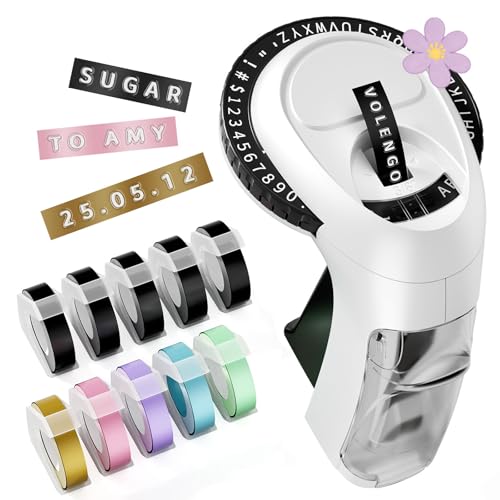
The VolenGo embossing label maker is designed for nostalgia-inspired labeling in scrapbooks and junk journals. Best for crafters who enjoy bold, readable 3D labels and a vintage feel. The 48-character POM wheel offers A–Z, 0–9, and symbols, enabling versatile labeling for sections, gifts, and classroom projects.
Who it’s best for: scrapbookers seeking retro aesthetics and durable, embossed labels. Why selected: the combination of 3D embossed tapes and a broad character set supports creative journaling and gifting ideas.
Caution: Your project labels may look different on non-porous surfaces; test a sample to ensure adhesion and legibility.
Nelko Label Maker Machine With Tape

The Nelko P21 is a compact Bluetooth label maker that pairs with iOS and Android devices to print on-the-go. It’s best for mobile labeling in classrooms, kitchens, or home offices where space is limited. The device emphasizes high-definition monochrome printing with a rechargeable battery for extended use.
Who it’s best for: travelers or students who want quick, wireless labeling. Why selected: its pocketable size and broad app library deliver strong value for occasional labeling tasks.
Limitation: It prints in monochrome and requires a compatible app; color labels depend on patterned tapes, and Google Android 14 compatibility may vary.
EazeID Embossing Label Maker Machine

The EazeID embossing label maker delivers a vintage, no-electricity labeling experience with a comfortable handheld design. It includes a 48-character starter kit (A–Z, 0–9, symbols) and a 3/8 inch embossing tape, making it ideal for scrapbooks and kids’ crafts.
Who it’s best for: beginners and hobbyists who want a simple, battery-free tool for creative labeling. Why selected: its retro look and tactile operation suit nostalgic crafts and DIY projects.
Caution: It is a manual tool; repeated use may require steady hand pressure for consistent embossing, especially on thicker papers.
Brother P-Touch PT-N20 Personal Desktop Label Maker

The Brother P-Touch PT-N20 is a desktop labeling solution with built-in fonts, frames, and symbols. It uses Brother Btag tapes (½ inch wide) and is suited for home organization, storage labeling, and creative journaling. It supports up to two-line labels with a total height of 9 mm.
Who it’s best for: hobbyists who want reliable, tag-like labels with varied typography and decorative frames. Why selected: its versatility with multiple fonts and frames supports expressive labeling in scrapbooks and around the home.
Limitation: Requires Brother Btag tapes and is heavier than handheld devices, which may affect portability for some users.
Phomemo D30 Label Maker

The Phomemo D30 offers a compact, Bluetooth-enabled embossing and label-creating experience with extensive design resources in its app. It supports continuous label tapes, multiple templates, fonts, icons, borders, and even functions like barcode and QR code generation for more advanced projects.
Who it’s best for: scrapbookers who want a broad design toolkit and digital integration for complex layouts. Why selected: its combination of 3D embossing, a large template library, and practical in-app features suits rich, multi-element scrapbook pages.
Limitation: Printing is inkless and uses black text; color effects rely on patterned tapes, which may require additional purchase for vivid labels.
Buying Guide: Key Considerations For Scrapbooking Label Makers
- Label style: Do you prefer 3D embossed labels or flat thermal print? Embossing adds tactile texture, while thermal prints are crisp and fast.
- Portability vs. desktop use: Handheld models are ideal for on-the-go labeling, while desktop units suit home studios with larger projects.
- Media compatibility: Check tape width (commonly 9mm or 12mm) and available colors or patterns to match scrapbooking themes.
- Power needs: Manual embossers require no power; Bluetooth/USB models need charging or batteries and app support.
- Software and templates: For digital-capable devices, consider the breadth of fonts, icons, frames, and templates that fit your aesthetic.
- Durability and adhesive: Ensure the labels adhere well to scrapbook paper, plastic sleeves, or fabric, and resist wear from handling.
- Budget and ongoing costs: Factor in tapes and consumables since they influence long-term costs more than the base device.
Frequently Asked Questions
- What type of label maker is best for scrapbooking? A mix of embossed and thermal label makers can cover both decorative and functional labeling needs.
- Can embossing labels be used on all scrapbook surfaces? They work well on paper, cardstock, and many plastics, but test on glossy surfaces for legibility.
- Do these devices require ink? Most embossing and many thermal models do not require ink, relying on tape or embossed impressions.
- Are Bluetooth models worth it for scrapbookers? If you value templates, fonts, and remote printing from a phone or tablet, Bluetooth can add versatility.
- Is a desktop label maker better than a handheld one for scrapbooks? A desktop model offers more styles and stability for large pages, while handheld units are great for quick labeling on the go.
- Do labels leave residue on paper? Most modern tapes are designed for clean removal or residue-free adhesion; always test with your specific paper stock.
Leave a Reply