Best Printer and Heat Press Gear for T Shirt Making
For hobbyists and small studios alike, choosing the right machines to produce custom t-shirts is essential. This guide highlights five practical picks—from cartridge-free printers to heat presses—that can help you print vibrant designs and apply them with consistency. Each product is evaluated for ease of use, durability, and cost efficiency, so you can compare options at a glance and pick what fits your workflow.
| Product | Brand | Key Benefit | Amazon Link |
|---|---|---|---|
| Epson EcoTank ET-2800 | Epson | Cartridge-free printing with high page yield | View |
| HTVRONT Auto Heat Press Machine | HTVRONT | Auto press with consistent heat and timing | View |
| WHUBEFY 5 in 1 Heat Press | Whubefy | Multiple attachments for shirts, mugs, and more | View |
| Canon MegaTank G3270 | Canon | Low-maintenance ink system with large page yield | View |
| Brother Sublimation Printer | Brother | Ready for sublimation designs with compatible software | View |
Epson EcoTank ET-2800 All-in-One Printer

The Epson EcoTank ET-2800 is a compact, cartridge-free color printer designed for everyday home use with an emphasis on low running costs. It uses Micro Piezo Heat-Free Technology to produce vivid prints for transfer designs and documents. The model supports wireless connectivity and has enough speed for small batches, delivering up to 10 pages per minute for standard prints. Its cartridge-free approach means replacement ink bottles offer substantial savings and a higher page yield, helpful for occasional shirt transfer projects or other craft tasks where color accuracy matters.
Key considerations: While this unit excels as a general-purpose printer, it’s best paired with heat transfer methods that don’t require ultra-heavy workloads. It’s a practical choice for color proofs and basic transfer designs. The EcoTank line is known for lower ink costs and easier refill processes, which helps keep the setup approachable for beginners and small teams alike.
HTVRONT Auto Heat Press Machine for T Shirts
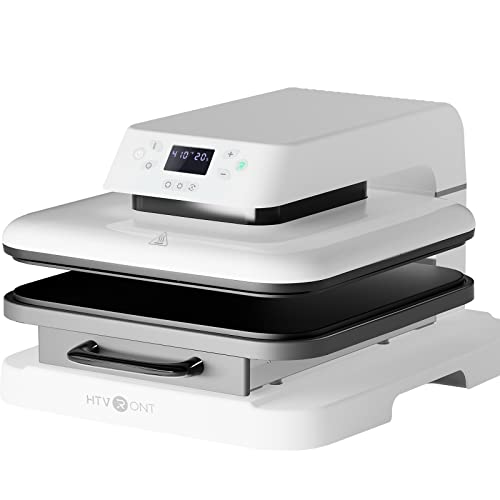
The HTVRONT 15×15 Auto Heat Press is designed to simplify heat transfer work. It features an auto-release mechanism and automatic pressure adjustment to match project thickness up to 1 inch. The unit reaches target temperatures quickly—320°F (160°C) in about four minutes and higher temperatures in under five minutes—supporting faster production cycles. With multiple operation modes, this press is suitable for sublimation, vinyl transfers, and other heat-applied graphics for textiles. It’s a straightforward option for hobbyists or small makers who want consistent results without constant supervision.
Key considerations: Auto features reduce attention during press cycles, but users should still monitor heat and time to avoid over-pressing delicate fabrics. The ability to handle a range of transfer types makes it versatile for different design projects, though setup space and power requirements should be considered in smaller studios or home offices.
WHUBEFY 5 in 1 Heat Press

The WHUBEFY 5 in 1 heat press expands beyond t-shirts with accessories for caps, mugs, and small plates. It features a 360-degree rotation, which helps with precise, consistent transfers across different surfaces. The digital LCD control allows precise setting of temperature and timer, with a wide range from 200-450°F (95-232°C) and 0-999 seconds. This setup supports safe handling and repeatable results for multi-item projects, enabling small shops to diversify product offerings without switching machines frequently.
Key considerations: The 5-in-1 format adds value for makers who print on multiple substrates, but users should verify platen sizes and compatibility with their typical transfer materials. Proper calibration of heat and pressure is important to ensure that designs render crisply and evenly.
Canon MegaTank G3270 All-in-One Printer

The Canon MegaTank G3270 offers a wireless all-in-one experience with a focus on high-page yield and simplicity. The MegaTank system replaces cartridges with refillable ink tanks, making maintenance straightforward and ink costs predictable. This model supports printing, scanning, and copying with reliable wireless connectivity, which can be convenient for in-house design proofs and mockups before applying heat transfers. Its robust ink system helps maintain color integrity across multiple print runs, a beneficial trait when preparing artwork for t-shirt applications.
Key considerations: While primarily a general-purpose printer, this unit’s low-maintenance ink system and wireless setup are appealing for small studios that print color proofs or batch designs. It’s wise to pair with heat transfer methods that suit the printer’s color output and paper types to achieve accurate transfer results.
Brother Sublimation Printer

The Brother Sublimation Printer is positioned for sublimation enthusiasts with software options like Artspira to manage designs, import patterns, and convert images for transfer. This approach emphasizes a ready-to-transfer workflow, enabling users to create on-screen designs, print them, and apply them via heat, with a companion app supporting design variations and a library of sublimation-ready templates. It’s suited for makers who want a streamlined path from digital artwork to finished textile product and who value integration with design apps for rapid iteration.
Key considerations: Compatibility with heat presses and transfer materials is essential for best results. The Brother solution pairs well with a dedicated heat press and the right substrates to realize sharp, color-rich transfers. Users should evaluate software needs and learning curves when adopting Artspira for project management.
Buying Guide: Key Purchase Considerations For T Shirt Making
- Purpose and workflow: Decide whether you primarily need a reliable printer for proofs and color tests or a full setup for mass t-shirt production with heat transfer. A combination of a low-maintenance printer and a capable heat press often works best.
- Ink system and maintenance: Cartridge-free systems (like EcoTank, MegaTank) reduce recurring costs and downtime for refills, which is valuable for frequent color work. Consider refilling logistics and space for ink bottles.
- Heat press features: Auto-release and adjustable pressure help with consistent transfers across fabrics. A multi-attachment press enables broader product options (hats, mugs, plates) but requires calibration and space.
- Material compatibility: Check substrate compatibility, transfer paper types, and ink chemistries. Sublimation typically works best on polyester blends or coated substrates; ensure your chosen printer and press align with your material choices.
- Software and design workflow: Some devices integrate with mobile apps or design software to streamline layouts. If you plan to use digital art, ensure compatibility with your preferred design tools.
- Space and budget: Compact all-in-one devices fit small spaces, but dedicated heat presses require ventilation and sturdy surfaces. Balance upfront investment with ongoing operating costs.
- Support and warranties: For hobbyists, a solid support policy and accessible replacement parts help extend the life of the setup. Consider brands with robust customer service and accessible spare parts.
In summary, combining a cartridge-free printer with a versatile heat press offers a practical, scalable path to creating customized apparel. The Epson EcoTank ET-2800 and Canon MegaTank G3270 provide dependable printing and low maintenance, while heat presses such as the HTVRONT Auto Heat Press and WHUBEFY 5 in 1 expand your transfer capabilities. For design-oriented pathways, the Brother Sublimation Printer brings software integration to the process, enabling a smoother transition from digital designs to wearable art. Each option supports different scales of operation, so match features to your production goals and available workspace.
Leave a Reply