Best Projector for Tracing Art: Top Picks for Precise, Portable Drafting
For artists and designers, a dedicated drawing projector can turn reference images into accurate tracing and scalable sketches. The following selections prioritize sharp projection, accurate color, versatile mounting, and friendly interfaces for tracing workflows. Whether you work on canvases, easels, or walls, these projectors blend image clarity with intuitive drawing tools to support quick iterations and professional results.
Product Summary (selected 5):
- Caydo P3 Art Projector with Exclusive Drawing App (Brand: Caydo) — 1080P, auto focus, 40”-120” projection, built-in drawing app.
- Caydo M1C Art Projector (Brand: Caydo) — 4K support, rechargeable, portable tracing on various surfaces, 100’’ display.
- CiBest Mini Projector (Brand: CiBest) — 1080P full HD, compact, multiple input options, portable tracing helper.
- VISSPL Mini Projector (Brand: VISSPL) — 1080P, compact with tripod, eye-friendly, versatile for on-the-go tracing.
- ClokoWe Mini Projector (Brand: ClokoWe) — 1080P, compact, broad compatibility, suitable for quick tracing tasks.
Caydo P3 Art Projector With Drawing App

The Caydo P3 is built for artists seeking a dedicated tracing workflow. It features 1080P HD projection with 400 ANSI lumens for clear lines and accurate color on walls, easels, or boards. The auto-focus system narrows the time to a sharp image, typically under 3 seconds, ensuring minimal interruption during drawing sessions. A comprehensive, built-in drawing app offers grid layouts, 360° rotation, and four drawing modes—Gridify, Sketchify, Comicize, Monochromize—so creators can tailor the projection to their style. The projector supports 3.6 to 8.7 feet throw distances, enables 4K video playback, and promises a long lamp life for extended use.
Key advantages for tracing include the auto-focus capability that maintains proportional accuracy as you adjust project distance, plus the ability to change background colors to reduce glare on diverse surfaces. The compact form and wall-to-wall reach make it a strong candidate for studio setups or mobile sketch sessions.
ELEPHAS Mini Projector For Tracing On The Go
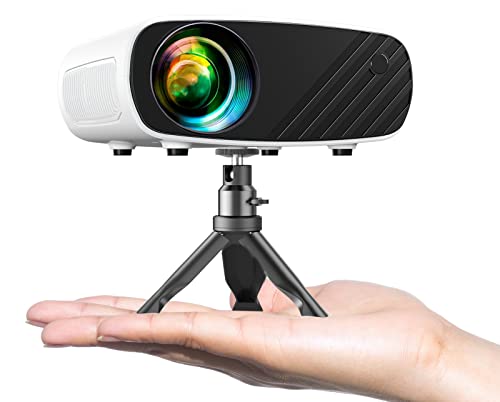
The ELEPHAS 2025 Upgraded Mini Projector emphasizes portability and 1080P HD projection, with a compact footprint comparable to a smartphone. It ships with a tripod and supports a range of devices (iOS, Android, Windows) for drawing references and tracing on various surfaces. The device leverages a German emerald glass lens and a 24-bit color system to deliver rich, accurate visuals up to approximately 200 inches. A quiet cooling system helps maintain focus during longer drawing sessions, while the included accessories simplify quick setup in diverse environments.
For trace work, the combination of a small footprint and sturdy stand makes it easy to position at the correct height. The broad compatibility with iOS/Android devices supports direct projection from tablets or phones, which is useful for tracing reference images and transferring sketches to larger media.
CiBest Mini Projector 2025 Upgrade

The CiBest Mini Projector focuses on portability without sacrificing essential 1080P Full HD clarity. It provides a compact footprint with a 60–130 inch recommended display size, making it adaptable for small studios or field sketching. While it notes that Wi-Fi and Bluetooth are not included, multiple devices can connect via HDMI, USB, and AV, enabling projection from smartphones, tablets, laptops, and media devices. The result is a reliable tracer-friendly tool for tracing lines and transferring reference proportions to paper or canvas.
Edge-to-edge brightness is optimized to preserve line clarity, while a lightweight build supports quick repositioning for tracing tasks across different surfaces. The device supports a variety of connection methods to accommodate user preferences and project requirements.
ClokoWe Mini Projector With 1080P Clarity

The ClokoWe mini projector delivers 1080P full HD projection in a compact form factor designed for portable tracing workflows. The projector’s small size makes it ideal for artists who require a mobile tracing setup, while its LED brightness and uniform illumination help keep line work crisp on different surfaces. Built to work with iOS, Android, Windows, TV sticks, HDMI devices, and USB drives, it supports quick display of reference images for tracing or sketching sessions. The device’s portability makes it suitable for outdoor drawing sessions or gallery setups where quick projection is needed.
Users should consider ambient lighting and screen size when planning tracing tasks, but the ClokoWe unit provides a balance of portability and usable brightness for typical studio and field work. The broad device compatibility supports a flexible workflow across various devices and media types.
SKUOU Mini Portable Projector With 4K Support

The SKUOU HY300 ULTRA brings Android TV 11.0, 160 ANSI brightness, and a wide 210° rotation capability for flexible projection angles. While the device emphasizes multi-rotational placement, it also includes a 5W sound base for audio without extra speakers. The short-throw capability enables a 100-inch image from about two meters, which is helpful when tracing on small canvases or on work tables. Bluetooth 5.4 and an expanding app ecosystem support streaming services, useful for cross-referencing art references during tracing tasks. The unit’s upgraded GPU and WiFi 6 ensure smoother media display and app performance.
For tracing, the key considerations are projection clarity, distance flexibility, and app support for drawing workflows. This model combines a strong feature set with mobility, making it suitable for artists who need to trace directly from reference images on-site or in a studio setting.
Buying Guide: Key Purchase Considerations For Tracing Art
- Resolution and image clarity: For precise tracing, prioritize 1080P or higher with good contrast and color accuracy. Look for auto focus and keystone correction to maintain proportional accuracy when projecting at varied distances and angles.
- Throw distance and screen size: Consider throw range and the maximum display size you’ll typically use. Short-throw models are helpful in small studios, while longer throw can keep images large without moving the projector too close to the surface.
- Built-in drawing tools vs. external workflows: Some projectors include exclusive drawing apps with grids and rotation, which can streamline tracing without extra software. Others rely on external tablets or computers; ensure compatibility with your preferred workflow.
- Connectivity and device compatibility: Check HDMI/USB input availability, wireless options, and compatibility with iOS/Android/Windows. For mobile tracing, direct device mirroring can save setup time.
- Portability and setup time: If you trace in multiple locations, prioritize compact form factors, tripod compatibility, and quick-start features like auto focus and built-in batteries (where applicable).
- Longevity and maintenance: A longer lamp life reduces replacement frequency. Look for LED or laser-based projection for stable brightness over time, and consider warranty coverage for creative tools that see frequent use.
- Surface and environment considerations: Tracing is easiest on smooth, light-colored walls or projection screens. In bright rooms, higher brightness and lamp efficiency help maintain line clarity.
- Price-to-value balance: Compare features like built-in drawing tools, projection size, and device ecosystem to determine whether the extra cost translates into meaningful workflow improvements for tracing tasks.
In short, the best projector for tracing art combines reliable projection quality, adaptable mounting, and workflow-friendly features. When evaluating options, map your typical tracing scenarios—studio, classroom, or field—and choose a model that aligns with distance, surface, and device preferences. The listed products offer a range of capabilities from built-in drawing apps to portable, high-clarity projection suitable for artists of all levels.
Leave a Reply