Best Printable Business Cards for Professionals, From Budget to Premium
If you’re searching for stock that delivers crisp text, clean edges, and reliable printer feeds, you’ve found the right guide. This article compares five top-rated printable business card options that work with laser or inkjet printers. Best for small startups, freelancers, or corporate admins, these picks balance print quality, edge integrity, and ease of use. The table below briefly lists each option to help you compare at a glance.
| Product | Brand | Format | Best For |
|---|---|---|---|
| Avery 28371 White 2×3.5 blank cards | Avery | Inkjet, 100 cards | Budget-friendly, frequent customization |
| Avery 5871 Clean Edge 2×3.5 blank cards | Avery | Laser, 200 cards | Bulk printing, clean edges |
| XXINMOH Thick 3.5×2 blank cards | XXINMOH | Laser & Inkjet, 500 cards | Heavyweight, professional look |
| Litpoetic Perforated 3.5×2 sheets | Litpoetic | Inkjet & Laser, perforated | On-the-go handouts, easy separation |
| Litpoetic 3.5×2 perforated 10-sheet packs | Litpoetic | Inkjet & Laser, perforated | Value packs with perforation |
| YIXUNHL 100 Sheets 2×3.5 cardstock | YIXUNHL | Cardstock, multiple uses | Crafts, DIY branding projects |
| Avery 05371 250 blank 2×3.5 cards | Avery | Laser, 250 cards | Premium templates, reliable feed |
| Avery 28878 Clean Edge 2×3.5 blank cards | Avery | Inkjet, 90 cards | Premium edges for detailed designs |
Avery Printable Business Cards with Sure Feed Technology

Avery 28371 White 2″ x 3.5″ blank cards use Sure Feed Technology to minimize misfeeds and jams, making them reliable for routine printing. The cardstock is white and designed for general printer use, delivering steady results for DIY branding. Best for individuals who print occasionally and need consistent alignment without paying for premium stock.
Best for: Solo professionals, freelancers, or small teams that print business cards in-house on an inkjet printer. Why selected: It provides reliable feed and clean edges at a low cost per card. Limitation: Fewer per-pack options compared with higher-volume sheets.
Avery Clean Edge Printable Business Cards with Sure Feed Technology

Avery 5871 Clean Edge blank cards are designed for laser printers, featuring Clean Edge technology for easy snapping apart with clean, smooth edges. The Sure Feed technology helps with alignment, reducing jams and misprints. This option suits offices that print larger batches and value sharp edges for professional layouts.
Best for: Small businesses needing bulk printing with precise edges. Why selected: Clean Edge design helps create a polished appearance. Caution: Less compatible with some inkjet printers; best with laser devices and templates that match the sheet format.
XXINMOH Thick 500 Printable Business Cards

XXINMOH provides 500 blank cards at 250gsm cardstock, enabling a heavyweight, premium-feel card suitable for formal networking. The kit includes perforation-ready cards for quick separation. Best for: Professionals who want a sturdy card and plan to print a lot in one session. Why selected: High-quality thickness helps cards stand out. Limitation: Heavier stock may require printer calibration and slower feeds.
Litpoetic 250 Blank Perforated Printable Cards

Litpoetic offers perforated 3.5″ x 2″ sheets with perforations for easy separation and compatibility with inkjet and laser printers. This option is ideal for on-the-go handouts and casual networking. Best for: Event coordinators, consultants, and small businesses that swap cards often. Caution: Perforated lines may subtly affect edge precision for some highly-detail designs.
Litpoetic 1000 Pieces Perforated Blank Cards
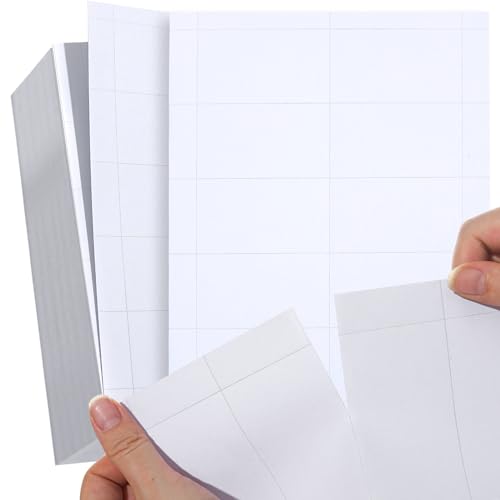
This set covers 1000 blank business cards on perforated sheets, designed for inkjet or laser printing. The 3.5″ x 2″ format is standard for easy replacement, with perforations enabling quick separation. Best for: Large events, offices printing in bulk, or branding teams focusing on efficiency. Caution: Weight and bulk can require careful handling to avoid jams in some older printers.
YIXUNHL 100 Sheets Blank Cardstock

YIXUNHL offers 2×3.5 inch heavy-weight cardstock suited for crafts and DIY branding projects, not primarily designed as standard business card stock but suitable for custom projects where durability matters. Best for: Creative teams and crafters who incorporate business cards into mixed-media pieces. Caution: Not specifically optimized for standard office card printing alignment features.
Buying Guide
What matters most when choosing business card stock? Look for print compatibility (inkjet vs laser), card weight (gsm/lb), edge design (Clean Edge or standard), and feed reliability (Sure Feed or similar). Consider whether you need perforated, ready-to-snap cards for quick handouts, or solid, non-perforated stock for a premium finish. Matching the stock to your printer type reduces jams and misprints.
Printer Type And Edge Quality
Choose laser-compatible stock for high-volume printing with crisp edges. If you primarily print with an inkjet, select edge-treated or Clean Edge designs, which minimize tearing and ensure smooth borders around each card.
Weight, Feel, And Durability
Cardstock around 250gsm or higher provides a substantial feel and durability, making a strong first impression. Heavier cards tend to lie flat and resist bending, which is important for professional handouts or mailers.
Perforation And Ease Of Separation
Perforated sheets save time when you need multiple cards quickly. They work well for on-the-go networking, but edge quality may be affected in some printers. If precision is critical for your designs, avoid perforations or test a sample first.
Templates And Design Freedom
Stock that integrates with free online design tools saves time and ensures alignment with printer settings. Templates help you place logos, contact details, and QR codes consistently across batches.
Budget And Volume Considerations
For occasional use, smaller packs with reliable feed are cost-effective. For events, bulk stock reduces unit cost and speeds up production. Weigh the benefit of bulk sheets against printer capacity and ink/toner usage.
FAQ
- Which card stock is best for inkjet printers? Most premium options labeled for inkjet are best for color clarity and image fidelity on inkjet machines.
- Are perforated cards actually easier to separate? Yes, perforations allow quick tearing but can slightly affect edge precision for detailed designs.
- Can I use laser and inkjet stock in the same printer? It depends on the printer’s capabilities. Mixing stock types may cause jams; use matching stock to your printer type.
- Is edge technology important for professional cards? Clean Edge or similar edge designs help cards snap apart cleanly and present a crisp border.
- Do blank cards require templates? Yes. Using templates ensures alignment, margins, and font sizes translate correctly from screen to print.
- How many cards should I print per batch? For efficiency, print in batches that align with your upcoming events or mailing needs to reduce waste and reprints.
Leave a Reply