Best Vinyl Decal Maker: Top Picked Machines for DIY Sticker Creations
Answer: A vinyl decal maker helps you design and cut custom stickers with precision, ideal for crafters, hobbyists, party planners, and small business owners. The best options blend easy setup, reliable connectivity, and versatile media support. This guide compares five top picks to help you choose the right machine for your needs, whether you’re making party favors, branding stickers, or classroom projects. Each product section explains who it’s best for and why it was chosen, along with practical cautions to consider before buying.
| Product | Brand | Best For | Why It Stands Out |
|---|---|---|---|
| Likcut S501 AI Smart Cutter | LIKCUT | Advanced DIY projects and AI-design fans | Fast cuts, AI image-to-cut, portable and Bluetooth/USB connectivity |
| Cricut Joy Xtra | Cricut | Colorful, printable stickers and crafts | Print-Then-Cut with inkjet compatibility and broad media support |
| VEVOR 28″ Vinyl Cutter | VEVOR | Large projects and batch work | Large cutting area with robust motors and extensive accessories |
| Cricut Maker 4 Bundle | Cricut | Comprehensive starter for stickers and apparel | All-in-one bundle with supplies and versatile tooling |
| Likcut S41 Vinyl Cutter | LIKCUT | Print-Then-Cut and room decor | AI image generation, precise cutting, dual-mode connectivity |
Likcut S501 AI Smart Cutter for Vinyl & Paper Crafts
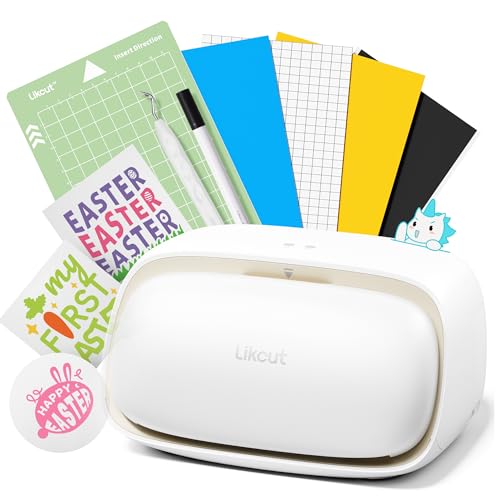
The Likcut S501 AI Smart Cutter is designed for DIY enthusiasts who want AI-powered design-to-cut workflows. Best for crafters who enjoy quick setup and AI-assisted design entry, it supports Bluetooth 5.0 and USB 2.0 for fast, stable connections and can cut intricate shapes with a capable blade. The built-in storage front panel helps keep tools within reach during school projects or home crafts. This model excels in party planning and small-batch production where speed and accuracy matter, though it may require familiarization with AI features for optimal results.
Likcut S41 Vinyl Cutter With Print Then Cut

The Likcut S41 focuses on a streamlined 3-step workflow and dual connectivity to minimize interruptions during cutting. It supports print-then-cut workflows and precise alignment, making it well-suited for room decor, card making, and small sticker sets. Best for classrooms and hobbyists who want dependable, plug-and-play operation without intricate software steps. A potential limitation is reliance on app-calibrated cuts, so users should verify calibration for consistent results on thick materials.
VEVOR Vinyl Cutter Machine, 28″ Bundle

The VEVOR 28″ cutter is built for larger projects and batch work, with a wide cutting area and strong stepper motors for stable performance. It offers adjustable cutting pressure and speed, a clear LCD readout, and a substantial accessory package that includes multiple vinyl rolls. This model is best for makers who routinely produce large decals or multiple signs. A limitation to watch is the size of the footprint and the need for a compatible workspace and power setup.
Cricut Maker 4 Starter Kit for Beginners

The Cricut Maker 4 Starter Kit bundles a versatile cutting machine with essential tools, vinyl, and materials to begin sticker and apparel projects immediately. It supports print-then-cut workflows with compatible designs via Design Space, and is aimed at beginners who want a comprehensive, all-in-one entry into sticker making and small business endeavors. Consider this option if you value an included material starter pack and broad material support from the start.
Cricut Joy Xtra Digital Version

The Cricut Joy Xtra emphasizes endless creation and personalization through its Print-Then-Cut capability and compatibility with a wide material set. It integrates with inkjet printers for full-color sticker designs and is compatible with 50+ materials, including vinyl and cardstock. Best for crafters who want color-rich, quick-turn stickers and simple label production. A potential limitation is the need for an inkjet printer to fully leverage the Print-Then-Cut feature.
Buying Guide
What should you consider when choosing a vinyl decal maker?
- Project size and volume: Do you primarily make small decals or larger signage? Larger cutters like the VEVOR offer more width, while desktop units fit home desks.
- Connectivity: Do you prefer wired, wireless, or dual-mode? Bluetooth or USB can affect latency and reliability during long runs.
- Material compatibility: Look for machines that handle vinyl, iron-on, cardstock, and printable media if you want flexibility for stickers and apparel.
- Software workflow: Some machines offer AI or Print-Then-Cut features, which streamline design-to-cut steps for beginners and pros alike.
- Starter options: Bundles with vinyl, poster paper, and tools save setup time but ensure the included supplies match your intended projects.
- Maintenance and reliability: Consider blade life, calibration routines, and front-access storage for tools to keep your workspace organized.
Which features maximize value for decal making?
- Print-Then-Cut capability: Ideal for full-color labels and complex designs.
- Precision and speed: Higher speeds reduce production time; precision ensures clean edge cuts on small stickers.
- Calibration tools: Accurate alignment reduces waste and mis-cuts, especially on thick or coated media.
- Advanced AI design: Voice or text-driven design can shorten the learning curve for new users.
- Front storage and workspace organization: Integrated storage helps manage tools during long sessions.
Who should choose which option?
- Best overall for AI design integration: Likcut S501 or S41—great for tech-forward crafters who want quick AI-to-cut workflows.
- Best for colorful, printable stickers: Cricut Joy Xtra—prints and cuts with inkjet printers for vibrant designs.
- Best for large projects or batch work: VEVOR 28″ Cutter—offers a broad cutting area and robust motor performance.
- Best starter kit with everything included: Cricut Maker 4 Bundle—suitable for beginners who want immediate sticker and apparel projects.
- Best blend of features for beginners with AI: Cricut Explore 5 Essential Bundle + Digital Content—covers basic materials with ample project potential.
FAQ
- What type of medium can I cut with these machines? Most support vinyl, cardstock, iron-on, and printable media; check each model for thickness and material limits.
- Is Print-Then-Cut necessary for stickers? Not always, but it enables full-color designs; a dedicated printer is required for that workflow.
- Do these machines require a computer? Many connect via USB or Bluetooth and work with companion apps or Design Space; some features are web/app-based.
- Which machine is best for classroom use? A model with reliable connectivity, simple setup, and front-tool storage helps instructors manage supplies effectively.
- Can these devices handle party decorations? Yes, many models excel at quick-turn party favors, banners, and customized decor.
- Do I need professional software to operate them? Most offer integrated design software or app-based interfaces; some models pair with third-party programs.
Leave a Reply