Best Wood Engraving and Cutting Machine for Precise DIY Projects
Discover top-rated wood engraving and cutting machines designed for hobbyists, educators, and small studios. This guide highlights five versatile models that balance power, accuracy, and ease of use, helping you transform wood, acrylic, and other materials into detailed designs and professional-grade projects. Each entry focuses on performance, software compatibility, and practical features to support a range of applications from classroom projects to maker business needs.
Below is a quick overview of the selected models, including key specifications to help you compare at a glance. The table summarizes working area, laser power, and notable capabilities for fast reference.
| Product | Brand | Working Area | Laser Power | Notable |
|---|---|---|---|---|
| ACMER S1 3500mW | ACMER | 130×130 mm | 3500 mW | High precision, wide material support |
| ACMER S1 6000mW | ACMER | 130×130 mm | 6000 mW | More power for thicker or deeper cuts |
| ACMER S1 2500mW | ACMER | 130×130 mm | 2500 mW | Compact desktop, STEM education friendly |
| Longer RAY5 | Longer | 130×140 mm | 3500 mW | Fast engraving, robust build |
| Creality Falcon2 Pro 60W | Creality | Enclosed workspace varies | 60 W | Class 1 safety, camera, enclosure |
ACMER S1 Laser Engraver 3500mW

The ACMER S1 3500mW model is designed for high-precision engraving and cutting with a 0.04 mm spot size and a 2 mm focal length. It delivers up to 10,000 mm/min engraving speed and a repeatable positioning accuracy of 0.01 mm, enabling intricate details on wood, acrylic, metal, glass, and more. It includes AcmerTool engraving software, plus compatibility with other popular programs, making it suitable for DIY projects and small businesses seeking reliable results. The 130×130 mm working area supports a variety of design scales, while the 455±5 nm wavelength ensures crisp contrast on light and dark substrates.
Features include dual-function engraving and cutting, enabling both outlines and filled patterns. The device supports materials like wood, bamboo, leather, plastic, PCB, and ceramics, and is compact enough for desktop use. The bundled software and versatile workflow options help users transition from ideas to finished pieces with minimal setup. This model is well-suited for hobbyists who value accuracy and software flexibility.
ACMER S1 Laser Engraver 6000mW

The 6000mW variant increases laser power and machine output to 48W, expanding capability for deeper cuts and faster material removal. It maintains the same 455±5 nm wavelength, 2 mm focal length, and a maximum speed around 10,000 mm/min with 0.01 mm repeatable precision. Like the 3500 mW model, it pairs with AcmerTool software and supports a broad material range, including wood, bamboo, leather, plastics, PCBs, and ceramics. This option is ideal for projects requiring stronger cuts or thicker samples while preserving fine detail in engraving.
Designed for versatility and ongoing use in small studios or classrooms, this version emphasizes dependable performance when working with layered materials or composites. The 130×130 mm workspace is compatible with medium-sized designs, and the overall build remains approachable for both beginners and experienced makers seeking improved throughput.
ACMER S1 Laser Engraver 2500mW

The 2500mW ACMER S1 targets compact desktop use with a focus on detail-oriented work for DIY crafts and education. It features a 0.04 mm laser spot and 2 mm focal length, delivering up to 10,000 mm/min engraving speed with 0.01 mm repeatable accuracy. It is explicitly noted as a strong option for STEM education, enabling students to translate ideas into tangible projects while teaching fundamental principles of design, engineering, and fabrication. The device supports a wide material range, including wood, acrylic, PVC, rubber, and paper, making it a flexible classroom or maker space tool.
Out of the box, this model emphasizes ease of setup and intuitive operation, which helps beginners gain confidence quickly. The 130×130 mm working area suits a broad array of personal projects, signage, and small-scale prototyping, while the integrated software options offer a straightforward path from concept to finished piece.
Artilume T1 Laser Engraver 3000mW

The Artilume T1 focuses on portability with a foldable design that enables storage and quick setup. It arrives pre-assembled and calibrated, reducing the typical complexity of laser systems. The 3W laser enables deeper engraving across materials like wood, leather, acrylic, coated metals, and more, with a 200×150 mm working area. The unit is designed for on-the-go crafting and classroom demonstrations while still offering precision up to 0.01 mm in designed patterns. It emphasizes user-friendliness and immediate usability, appealing to beginners and educators seeking a ready-to-create tool.
Note: While foldability adds convenience, users should consider material thickness limits and enclosure needs for safety and dust management in busy workspaces.
ACMER S1 Laser Engraver 2500mW (Second Listing)
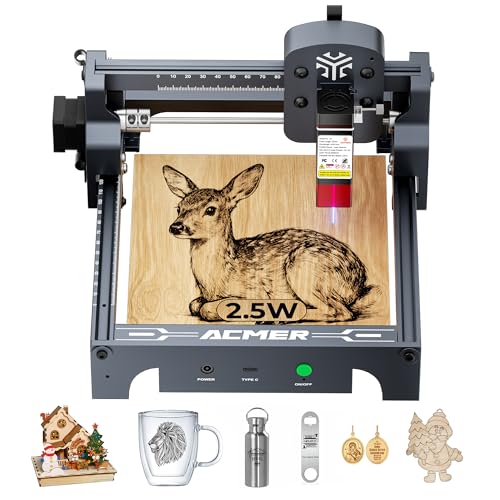
This variant repeats features similar to the 2500 mW model but with a focus on educational usage and STEM alignment. It retains the 0.04 mm laser spot, 2 mm focal length, and 10,000 mm/min engraving speed with 0.01 mm repeatability. The AcmerTool software integration and broad material compatibility remain central advantages, making it suitable for classrooms, hobbyists, and makers who want predictable outcomes in small-scale projects. The compact footprint supports desktop use while maintaining flexibility for a variety of engraving tasks.
Buying Guide: Key Purchase Considerations And Comparisons
When selecting a wood engraving and cutting machine, consider power, precision, material compatibility, and workflow options. Higher laser wattage generally enables deeper cuts and faster processing on denser materials, but it may require a larger power supply, better ventilation, and stricter safety measures. Look for a machine with a consistent focal length, repeatable accuracy, and a reliable guide system to minimize drift on long sessions.
Software compatibility is essential for long-term versatility. Systems that include a native software suite or support popular third-party tools offer smoother transitions between projects and teams. Accessibility features for beginners, such as pre-calibrated setups and ready-to-use templates, help reduce the learning curve without sacrificing capability for advanced users.
Safety features matter, especially in enclosed or shared spaces. Machines with Class 1 safety certification, protective enclosures, auto-stop when doors open, and integrated dust or fume management provide a safer environment for ongoing use in schools or cafes, as well as home workshops. Enclosures also help maintain a cleaner work area when engraving smaller parts or materials with dust generation.
Working area and portability influence project scale and storage. A compact 130×130 mm area supports many small designs, while slightly larger footprints like 130×140 mm offer more room for bigger components. Foldable or compact designs, like portable or classroom-friendly units, enable easy transport and setup in limited spaces, though they may trade some rigidity for travel-friendly performance.
Material versatility is a practical benefit for makers. Look for devices that handle wood, acrylic, leather, PCB, ceramics, and coated metals with reasonable depth limits. Consider future needs—if you plan to work with thicker woods or multi-layered pieces, a higher wattage model may reduce throughput and simplify tasks.
Budget and total cost of ownership should balance initial price with ongoing consumables, potential maintenance, and software updates. Pick a model with accessible replacement parts, reputable customer support, and an active community or knowledge base to help with troubleshooting and project ideas.
Leave a Reply