Best Clear Labels for Wedding Invitations
Clear address labels create a seamless, professional look for wedding invitations. This guide highlights five top options that balance visibility, ease of use, and printer compatibility. Each choice is best for different invitation styles and printer setups, so you can match your needs precisely.
The following quick-reference table helps compare core details at a glance. It includes the product name, best-use scenario, and standout feature to help you decide quickly.
| Product | ||
|---|---|---|
| Avery Sure Feed Matte Clear (18660) | Vellum or light envelopes; elegant frosted finish | Reliable Sure Feed for fewer misfeeds |
| Avery Glossy Clear (6521) | Glass-like transparency on glass/plastic envelopes | Completely transparent, glossy finish |
| Avery Matte Clear Laser (15660) | Textured or frosted substrates; white/light envelopes | Frosted look that vanishes on light backgrounds |
| Premium Label Supply Glossy Clear (2″ x 4″) | Larger labels for wedding enclosures or directions | High visibility with strong adhesive |
| Risepekt 1″ x 2-5/8″ Clear (30-up) | Bulk mailing with easy-to-peel sheets | Writable surface and broad printer compatibility |
In the sections below, you’ll find concise details for each product, including who it’s best for, what makes it stand out, and a practical limitation to consider.
Avery Printable Address Labels with Sure Feed Matte Clear
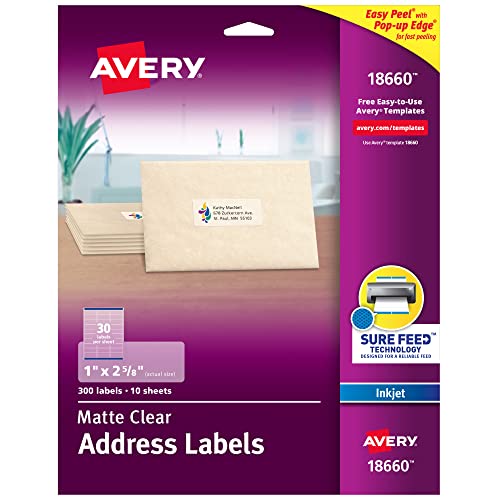
Best for: Vellum or light envelopes with a matte finish. These labels blend subtly, giving a refined, printed-on look on white or pale surfaces. They are ideal when you want the text to read clearly without glare. The Sure Feed technology reduces misalignment and printer jams, making this a reliable choice for bulk invitations. The printable surface works well in standard home or office inkjet printers.
Why chosen: It balances an elegant frosted appearance with dependable printing reliability. The easy-peel feature supports quick labeling during a busy invitation assembly workflow.
Caution: The matte finish may show fingerprints more readily on very glossy or dark envelopes, so test a sample to confirm appearance before mass printing.
Avery Printable Address Labels with Sure Feed Glossy Clear
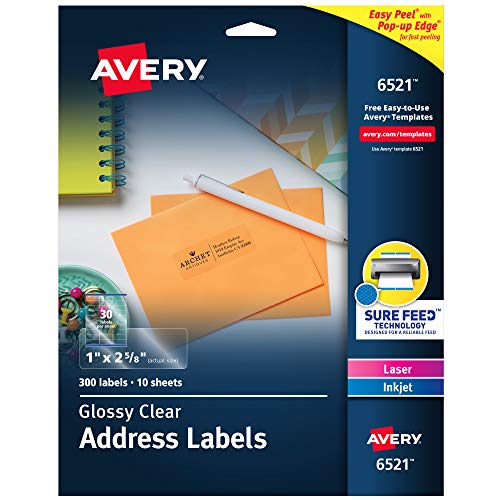
Best for: Envelopes where the label should visually disappear against glass or transparent surfaces. The glossy clear finish delivers a crystal-like appearance, ideal for modern wedding aesthetics on glassine or translucent envelopes. The Sure Feed system helps ensure clean alignment and reduces feeding issues in printers.
Why chosen: The glossy clarity makes text appear crisp and nearly invisible on clear backgrounds, which can elevate a minimalist invitation style.
Caution: Glossy surfaces can be more challenging for very light or pastel ink colors to read. Consider bold, legible font choices and a test print on a sample.
Avery Matte Clear Laser Labels (15660)

Best for: White or light-colored envelopes, textured vellum, and other frosted or translucent surfaces. The frosted finish blends nicely with traditional wedding stationery, creating a subtle, refined presentation. The laser-friendly surface supports high-precision printing and a clean, matte look.
Why chosen: This option emphasizes a soft, unobtrusive appearance that complements classic wedding invites without overpowering design elements.
Caution: Matte frosted finishes can be less forgiving if printer settings aren’t calibrated; start with a test sheet to avoid misprints.
Premium Label Supply Glossy Clear 2″ x 4″

Best for: Larger address labels that need standout visibility on envelopes or packaging, especially for formal invitations requiring clear labeling with a premium touch. The glossy surface delivers high legibility and a sophisticated look on multiple surfaces.
Why chosen: It combines crystal-clear transparency with a robust adhesive, making it suitable for a variety of mailing materials beyond standard envelopes. It’s a practical pick when you want a more prominent label without sacrificing clarity.
Caution: Larger labels may require more precise alignment; verify printer margins and do a test print if you’re printing many labels at once.
Risepekt 300 Pcs Clear 1″ x 2-5/8″ (30-up)

Best for: Bulk mailing with easy-to-peel sheets, suitable for both laser and inkjet printers. The writable surface lets you customize labels if you need to handwritten specifics or corrections. The compact size is a good fit for standard invitation sets with many recipients.
Why chosen: The writable feature adds flexibility for last-minute changes or notes to guests, while the 30-up layout maximizes sheet usage and efficiency during assembly.
Caution: The sheet format includes multiple labels per sheet; ensure your printer’s driver supports the 30-up arrangement to avoid alignment issues.
Buying Guide
What finish should I choose for wedding invites?
Matte finishes (frosted clear or frosted matte) provide a subtle, elegant look that blends with light envelopes and textured papers. Glossy finishes deliver a pristine, glass-like appearance that can disappear on clear surfaces but may reflect light more. Consider your envelope stock and invitation style when deciding.
How important is printer compatibility?
Look for Sure Feed technology or similar guaranteed-feed features if you print in bulk. Ensure your printer type (laser vs. inkjet) matches the label sheets to prevent jams or misfeeds. Do a test print with a single label before committing to dozens.
What about adhesion and durability?
Permanent adhesive is standard for mailing labels, ensuring they stay affixed during transit. If you mail on glossy or slick surfaces, a stronger adhesive may be helpful. Confirm if you need waterproof or smudge-resistant labels based on your guest addresses or packaging scenario.
Should I choose a large or small label?
Small labels (1″ x 2-5/8″) are common and fit most standard envelopes; larger labels (2″ x 4″ or similar) offer higher visibility on bulky envelopes or enclosure cards. For multiple recipients, you may want a mix to balance aesthetics and readability.
Are writable labels useful for wedding planning?
Writable surfaces enable last-minute edits or guest-specific notes. If you anticipate changes, choose writable options or keep spare sheets for revisions.
How many labels do I need?
Estimate invitations plus extras for possible typos, replacements, or guest responder tracking. Bulk packs (300 labels) are cost-effective and reduce reordering frequency during a high-volume wedding mailing.
FAQ
- Which label is best for frosted envelopes? Matte or frosted clear labels blend best with frosted or textured stationery to create a cohesive look.
- Can I use these labels for laser and inkjet printers? Yes. Check the label sheets’ compatibility notes to ensure the chosen product matches your printer type.
- Do labels affect envelope opening or guest reading? Labels should be legible with a clear font and appropriate font size. Avoid overly small text.
- Is it okay to reuse a label if printed wrong? Reprinting is recommended; test first on scrap labels to avoid waste.
- What’s a practical way to test layout? Print a sample on plain paper and hold it over the envelope to verify alignment and size before printing all labels.
- How many labels should I order? Aim for 10–20% extra for errors or last-minute guests, depending on your guest list size.
Leave a Reply